Evaluation rules
Evaluation rules automatically assess conversation quality after each call completes. They help you measure performance, identify areas for improvement, and ensure consistent service quality across the dimensions that matter to you.
What evaluation rules do
After a conversation ends, evaluation rules analyze the transcript and assign scores based on criteria you define. It is basically an AI agent assessing your AI agent. This automated quality assessment helps you:
- Measure agent performance consistently
- Identify successful conversations vs. ones that need improvement
- Track performance trends over time
- Find patterns in high-quality vs. low-quality interactions
Creating evaluation rules
To create an evaluation rule:
- Navigate to the Evaluation tab in the agent editor
- Click Add evaluation rule
- Configure the rule settings
Evaluation rule configuration
Name and Description
- Name: Clear identifier for this rule (e.g., "Customer Satisfaction", "Issue Resolution")
- Description: Explain what this rule measures and why it matters
Primary Rule
Toggle this ON to designate this as the primary evaluation rule. Only one rule can be primary.
The primary rule is:
- Featured prominently in conversation details
- Used for filtering and sorting conversations
- Highlighted in analytics dashboards
Your primary rule should measure the most important aspect of conversation success. For customer support, this might be "Issue resolution." For sales, it might be "Lead qualification quality."
Score type
Every evaluation rule has a score type that determines which values are available and how results are visualized in the Evaluations dashboard. Choose one of three types when creating a rule:
| Score type | Use case | Dashboard visualization |
|---|---|---|
| Pass / Fail | Binary outcomes — did something happen or not? | Pass rate (percentage) over time, excluding N/A conversations |
| Numeric | Scales and ratings (e.g., 1–5 stars) | Average score over time and score distribution |
| Categorical | Custom labels for multi-outcome assessments | Category breakdown (stacked area chart) showing proportion of each label over time |
New rules default to Pass / Fail. You can change the type at any time by editing the rule.
Pick Pass / Fail when there is a clear right/wrong answer (e.g., "Was the issue resolved?"). Pick Numeric when you want averages and trends (e.g., customer satisfaction on a 1–5 scale). Pick Categorical when outcomes don't fit a simple binary or numeric scale (e.g., Resolved / Partially Resolved / Escalated).
Score values
After selecting a score type, define the possible scores for this evaluation:
Pass / Fail — values are pre-populated and locked. You can customize the display label and description, but the underlying values (pass and fail) cannot be changed.
Numeric — add your own number values with labels:
1: Very Poor
2: Poor
3: Satisfactory
4: Good
5: Excellent
Categorical — add custom string labels:
Resolved: Customer's issue was fully resolved
Partially Resolved: Progress made but follow-up needed
Not Resolved: Issue remains unresolved
Escalated: Transferred to human agent
Not Applicable (N/A)
A Not Applicable option is automatically available for all evaluation rules regardless of score type. You don't need to add it yourself — it appears as a system-managed row below your defined values.
When the evaluation determines that a rule doesn't apply to a particular conversation (e.g., a compliance rule for a conversation that was disconnected before any meaningful interaction), it can assign N/A. These conversations are excluded from dashboard calculations — for example, a Pass / Fail rule's pass rate is calculated as Pass / (Pass + Fail), with N/A conversations excluded entirely. This prevents irrelevant conversations from skewing your metrics.
Scoring logic
Describe in natural language how to evaluate conversations and assign scores. Be specific about what constitutes each score level.
Example: Customer satisfaction rule
Evaluate the conversation for overall customer satisfaction based on these factors:

Score 5 (Excellent) when:
- Customer's question or issue was fully addressed
- Agent was helpful, polite, and efficient
- Customer expressed satisfaction or gratitude
- No frustration or negative sentiment from customer
- Conversation ended positively

Score 4 (Good) when:
- Customer's question or issue was addressed
- Agent was professional and helpful
- Minor hiccups but overall positive interaction
- No significant customer frustration

Score 3 (Satisfactory) when:
- Basic issue addressed but not ideal
- Some customer confusion or repetition
- Agent eventually helped but took longer than ideal
- Neutral customer sentiment

Score 2 (Poor) when:
- Issue not fully resolved
- Customer expressed frustration
- Agent made errors or provided incomplete information
- Required escalation or multiple attempts

Score 1 (Very poor) when:
- Issue not resolved
- Customer clearly frustrated or dissatisfied
- Agent failed to help effectively
- Conversation ended negatively
Example: Issue resolution rule
Evaluate whether the customer's issue was resolved:

Resolved:
- Customer explicitly confirmed their issue is fixed
- Agent successfully completed requested actions (e.g., refund processed, information provided)
- Customer expressed satisfaction with the outcome

Partially resolved:
- Agent provided helpful information but complete resolution requires follow-up
- Some progress made but customer needs additional assistance
- Transferred to appropriate department for completion

Not resolved:
- Customer's issue remains unaddressed
- Agent unable to help with the specific request
- Customer ended conversation still needing help

Escalated:
- Conversation transferred to human agent
- Issue too complex for AI agent
- Customer requested human assistance
How evaluation works
- Conversation completes: When a call ends, evaluation begins automatically
- Analysis: The AI reviews the full transcript
- Scoring: Based on your scoring logic, a score is assigned
- Results stored: Scores are saved with the conversation
- Visibility: Results appear in conversation details and analytics
Viewing evaluation results
When you view a conversation:
- Evaluation results appear near the top
- Primary rule is prominently displayed
- All evaluation rule scores are visible
- You can see the reasoning behind each score
Your primary score is also shown prominently in the Conversations overview and can be used for sorting and filtering of conversations.
Evaluations dashboard
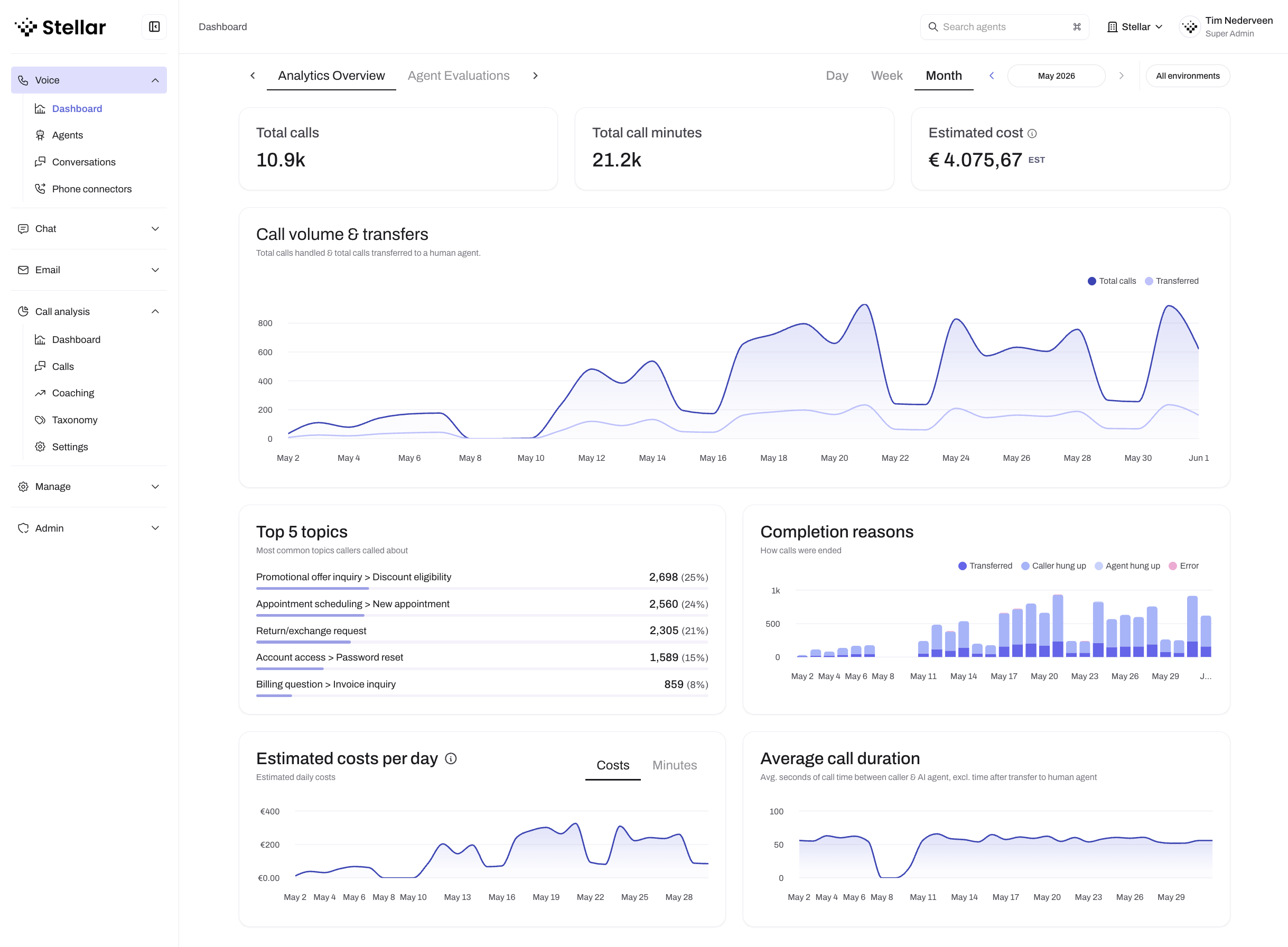 The Analytics dashboard visualizes evaluation scores, call volumes, and trends over time
The Analytics tab on any agent page includes charts for each evaluation rule. The score type you choose directly determines how each rule's data is visualized:
- Pass / Fail rules display a pass rate chart showing the percentage of conversations that passed over time. N/A conversations are excluded from the calculation, so your pass rate reflects only conversations where the rule was applicable.
- Numeric rules display an average score chart and a score distribution showing how conversations are spread across your defined values over time.
- Categorical rules display a stacked area chart showing the proportion of each category over time, making it easy to spot shifts in conversation outcomes.
You can export all evaluation data to Excel from the Analytics tab — see Exporting analytics data for details.
Multiple evaluation rules
You can create multiple evaluation rules to measure different aspects:
Example evaluation rules for a customer support agent:
- Issue resolution (Primary) - Was the problem solved?
- Customer satisfaction - How happy was the customer?
- Efficiency - Was the conversation efficient or too lengthy?
- Policy compliance - Did the agent follow company policies?
Each conversation receives a score for every active evaluation rule.
Best practices
Start with one rule
Begin with a single, clear primary rule that measures overall success. Add more rules once you understand how evaluation works.
Be specific
Vague scoring criteria lead to inconsistent results:
✅ Good: "Score 5 if customer explicitly confirms issue is resolved and expresses satisfaction"
❌ Too vague: "Score 5 if conversation went well"
Use clear score definitions
Each score level should have distinct, observable criteria that can be identified from the transcript.
Test your rules
After creating evaluation rules:
- Review several conversations with known outcomes
- Check if the evaluation scores match your assessment
- Refine the scoring logic based on results
- Iterate until scores are consistently accurate
Focus on actionable metrics
Choose evaluation criteria that:
- Measure what actually matters to your business
- Provide insights you can act on
- Help you improve agent performance
Combine score types
Use different score types across your rules to get a complete picture:
- Pass / Fail for clear success metrics (e.g., "Issue resolved")
- Numeric for trending and comparison (e.g., satisfaction 1–5)
- Categorical for understanding outcome distribution (e.g., resolution status)
Common evaluation rules
- Customer satisfaction (CSAT): Measures overall customer happiness with the interaction
- Issue resolution rate: Tracks how often customer problems are successfully solved
- First call resolution: Measures if the issue was resolved in the first conversation (no follow-up needed)
- Compliance score: Evaluates adherence to company policies, legal requirements, or script requirements
- Efficiency score: Assesses whether conversations are appropriately brief without rushing customers
- Tone and professionalism: Measures agent politeness, empathy, and professional communication
Limitations and considerations
Evaluation is performed by AI, which may occasionally misjudge nuanced situations. Spot-check evaluation results regularly to ensure accuracy and refine rules for better performance.
Improving evaluation accuracy
If evaluation results don't match your expectations:
- Review scoring logic: Make criteria more specific and detailed
- Add examples: Include example conversations in your scoring logic
- Refine score definitions: Clarify boundaries between score levels
- Test systematically: Run multiple known conversations through evaluation
- Iterate: Continuously refine based on results
Next steps
After setting up evaluation rules:
- Monitor evaluation results across conversations
- Use scores to identify training opportunities
- Track score trends to measure improvement over time
- Adjust agent configuration based on evaluation insights
- Filter conversations by score to review successes and failures